 /week free
AI website generators have gone from gimmick to genuinely useful in the past two years. Type "build me a portfolio site" into the right tool and a working website appears in under a minute. If you've ever wondered how does an AI website generator work under the hood — what's actually happening between your prompt and the live page — this guide pulls back the curtain in plain English.
What an AI website generator actually is
An AI website generator is a tool that takes a natural-language description ("a clean portfolio site for a wedding photographer with a contact form and gallery") and produces a working website without you writing code. Older website builders gave you templates and drag-and-drop blocks. AI website generators replace that manual assembly step with a language model that decides — for you — what pages you need, what each section should say, what photos to use, and how everything should be styled.
The category overlaps with a few related things people sometimes lump together: AI-assisted design tools (Figma plugins), AI-first content management systems, and "vibe coding" platforms where you describe an app and an LLM writes the code. They share the same engine — large language models — but each one optimizes for a different output.
How does an AI website generator work? The 5-step pipeline
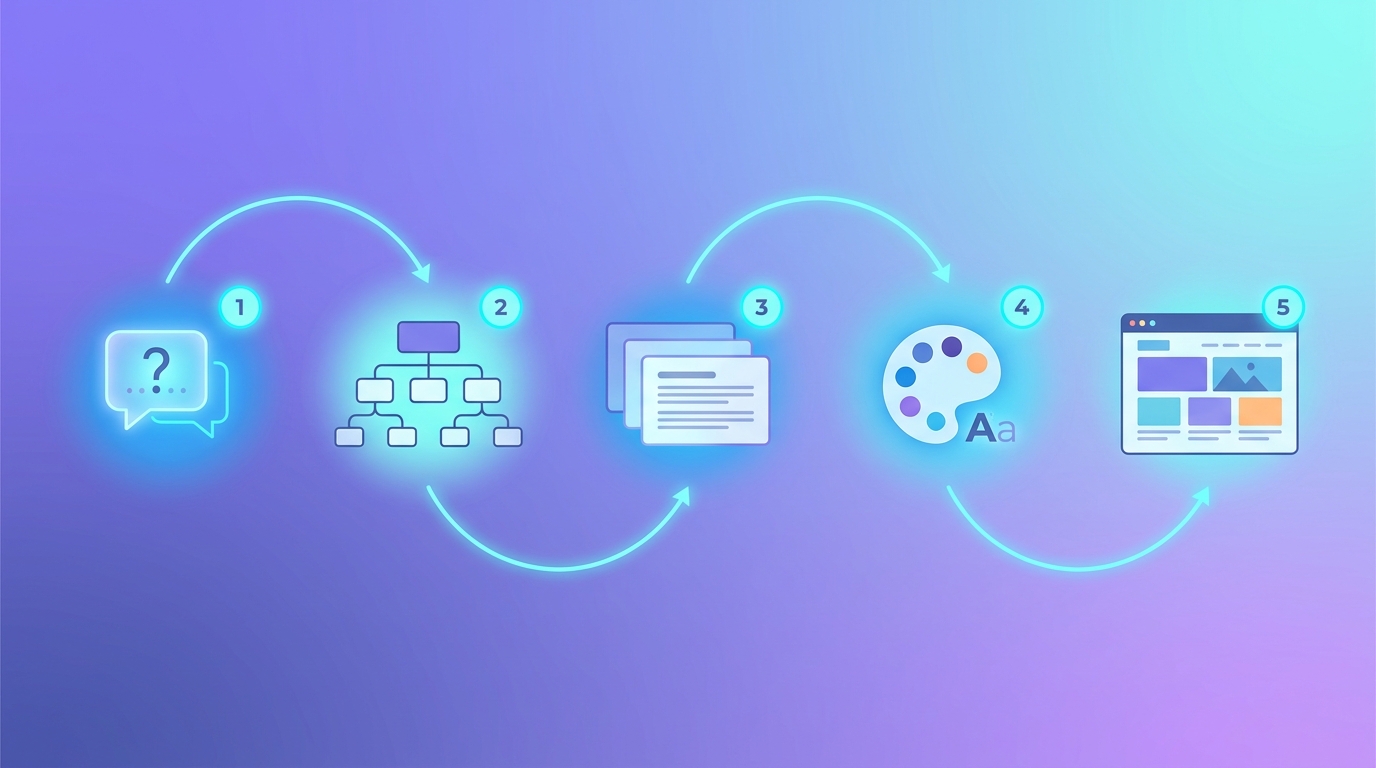
Almost every AI website generator on the market follows the same five-step pipeline under the hood. Different products do each step differently, but the shape is consistent.
Step 1 — You describe what you want
This is the input layer. You either type a freeform prompt ("a minimalist landing page for my dog grooming business") or you answer a few guided questions (industry, name, style preference, pages you need). Some tools also accept an existing site, document, or brand guide as additional context. The job of this step is to turn your intent into a structured brief the AI can act on.
Step 2 — The AI figures out the structure
Before any pixels appear, the model decides what pages your site needs and what sections go on each page. For a dog grooming business it might choose: Home, Services, Pricing, About, Contact — and on the home page it'll plan a hero, a service grid, testimonials, a booking CTA, and a footer. This is essentially the model behaving like an information architect: mapping your goal to a sitemap and a layout skeleton.
Step 3 — It writes the content
Now the model fills in the words. Headlines, subheads, body copy, button labels, FAQ entries, alt text — all generated to match your brief. This is where LLMs shine: they're trained on millions of marketing pages, so they know what a "services" section reads like, what a hero headline does, and how to keep tone consistent across pages. Better tools also pull in real facts (your hours, your phone number, your prices) rather than making them up.
Step 4 — It picks (or generates) a design
Two approaches dominate here. Template-based generators map your brief to a pre-built design system — fonts, colors, block components — and let the AI fill them with content. Generative-design tools go further and have the AI choose typography, color palette, spacing, and even custom illustrations or background images. Image generation models (the same family that powers AI portrait tools) often handle hero photos, icons, and pattern backgrounds at this step.
Step 5 — It assembles a working site
Finally, the system stitches everything into deliverable output: HTML/CSS files, a hosted page on the platform's infrastructure, or a project inside a CMS. Most modern tools render the result in a live editor where you can click any element, tweak the copy or swap an image, and re-publish. Behind the scenes this is usually a component-based system — each section is a reusable block — which is what makes the click-to-edit experience possible.
The pipeline visualized
The three flavors of AI website generator
Not all "AI website generators" do the same job. They split into three meaningful categories, and picking the right category matters more than picking the right brand.
1. Prompt-to-site builders ("vibe coders")
These are the closest thing to the demo videos. You type what you want, the AI generates a complete site, and you tweak it in a click-to-edit canvas. They're optimized for speed: minutes from idea to live URL. Best for landing pages, portfolios, marketing sites, MVP launches, and anything where you'd otherwise reach for a template.
2. AI-first CMSs
These flip the focus from building a site to running one. The generator part still exists — you can spin up pages with a prompt — but the real value is automating the ongoing content work: drafting blog posts with AI agents, scheduling, queueing items for human review, repurposing across channels. Best for publishers, content-heavy sites, and teams who'll add new pages every week.
3. Small-business website platforms
These bundle AI website generation with the rest of the small-business stack: bookings, invoicing, CRM, payments, email marketing, hosting. The AI is the on-ramp ("get a working site in 5 minutes") but the platform's job is to be the entire digital storefront. Best for non-technical owners who don't want to wire together five different SaaS tools.
Three real examples
Here's how those three flavors look in practice — three tools we build that cover the spread.
Three AI website generators, three different jobs
| Tool | Flavor | Best for | What's distinctive |
|---|---|---|---|
| 123rdy | Prompt-to-site builder | Quick landing pages, portfolios, marketing sites | Pick a template, describe your vision, deploy. 16 block types, click-to-edit, no vendor lock-in (download the ZIP and host anywhere) |
| Cainty | AI-first CMS | Publishers and content teams running ongoing sites | AI agents draft and queue content for human review. 24+ LLM models, plugin architecture, MIT-licensed and self-hostable |
| Nyrge | Small-business website platform | Owner-operated businesses that need a full digital storefront | Industry-specific templates plus integrated bookings, invoicing, CRM, and AI image generation in one subscription |
123rdy — the fastest path from idea to URL
If you want to see what "AI website generator" means in 60 seconds, 123rdy is the cleanest demo. You pick one of 12 starter templates, describe what you're building, and the AI generates structure, copy, and styled blocks. You can edit any block by clicking it, then either host on 123rdy or download the static files and put them anywhere. It maps to the classic "vibe coding" workflow — describe the vibe, get the site.
Cainty — when the site needs to keep producing content
A one-time site generation is fun, but most real websites need new content forever. Cainty is built for that: it's an AI-first open-source CMS where AI agents draft posts, propose updates, and queue work for a human reviewer. It connects to 24+ LLMs across six providers, supports multi-site setups from one install, and is MIT-licensed if you want to self-host. Think of it as the editorial back office for a site that an AI website generator might have spun up in the first place.
Nyrge — for small businesses that need the full stack
For owner-operated businesses — a salon, a tradesperson, a clinic — a website is just one piece of what they actually need. Nyrge bundles AI website generation with the rest: industry-tailored templates, an integrated booking system, invoicing (with Fiken in the Norwegian market), CRM, email marketing, and AI-generated imagery, all under one subscription. The AI gets a working site live fast; the platform makes sure the business can actually run on it.
The wider AI website generator market
The three tools above are ones we build, but the broader landscape is much larger. Below is a non-exhaustive map of major players you'll run into in 2026, organized by the same three flavors. Useful for context, comparison, and figuring out which tool is the right fit for your project.
Prompt-to-site builders
- v0 by Vercel — generates production-ready React/Next.js components and pages from prompts. Developer-leaning.
- Lovable — full-stack web app generator that builds, deploys, and iterates from a single chat thread.
- Bolt.new — StackBlitz's prompt-to-app tool that generates and runs entire web stacks directly in the browser.
- Durable — small-business focused; generates a complete site (with copy and stock imagery) in under a minute.
- Wix ADI — Wix's AI builder, one of the originals in the category.
- Framer AI — design-tool-first approach with AI generation layered into the canvas.
- 10Web — AI website generator built around WordPress.
- Mixo — focused on landing pages and idea-stage launches.
- 123rdy — the one we make. Template-led with click-to-edit and downloadable static output.
AI-first CMSs and AI design tools
- Webstudio — open-source visual builder with growing AI features.
- Plasmic — visual page builder with AI assistance, popular with product teams.
- WordPress + AI plugins — Elementor AI, Divi AI, and others bring AI generation into the dominant CMS.
- Storyblok — headless CMS with built-in AI authoring tooling.
- Sanity — headless CMS with AI features through its toolkit ecosystem.
- Cainty — the one we make. AI agents draft and queue content for human review; MIT-licensed and self-hostable.
Full-stack small-business platforms
- Wix — broadest small-business platform with extensive AI features layered into the existing builder.
- Squarespace — content generation via Squarespace AI alongside their template-strong builder.
- GoDaddy AIRO — GoDaddy's all-in-one small-business AI offering with bundled domain, hosting, and marketing.
- Hostinger AI Website Builder — budget end of the market, strong AI generation included with hosting plans.
- Squarespace Bio Sites / Hover — minimalist all-in-one for solopreneurs.
- Nyrge — the one we make. Norwegian-market focused with Fiken invoicing, bookings, CRM, and AI imagery in one subscription.
Several of these straddle multiple categories — Wix fits both prompt-to-site and small-business platform; Webstudio could be either an AI design tool or a CMS. The point isn't to memorize a taxonomy, it's to start with the job you need done and let the category narrow your shortlist.
What AI website generators are great at
- Cold starts. Going from blank page to a working draft in minutes is where they shine. The first 80% of a site is now nearly free.
- Decision fatigue. Picking fonts, colors, and section orders used to take hours. The model makes coherent choices instantly, and you only intervene when you disagree.
- Boilerplate copy. "About us" pages, FAQ entries, privacy policies, service descriptions — LLMs produce solid first drafts of all of these in seconds.
- Iterating on a brief. "Make it more playful" or "shorten the headlines" used to mean rewriting; now it's a prompt.
Where they still struggle
- Brand-specific facts. The model can't invent your real prices, real testimonials, or real team bios. Tools that ask for these explicitly produce much better output than ones that don't.
- Highly custom layouts. If you have a specific, unusual layout in mind, prompting the AI is sometimes slower than just dragging blocks around.
- True originality. AI-generated sites tend to converge on a style. Distinctive design still benefits from a human designer's hand, even if the bones come from AI.
- Long-term content. A generator gets you live; it doesn't keep your site fresh. That's why AI-first CMSs exist.
How to pick the right one for you
- Need a site live today for a one-off project? → a prompt-to-site builder like 123rdy.
- Running an ongoing publication or content-driven site? → an AI-first CMS like Cainty.
- Small business that needs site + bookings + invoicing in one place? → a small-business platform like Nyrge.
The takeaway
Under the buzzwords, every AI website generator is doing the same thing: turning a description into a structure, into copy, into design, into a deliverable site. The differences between products are mostly about which step they specialize in and what they bundle around it. Once you understand the pipeline, picking the right tool is just a matter of matching it to which step your project most needs help with.